

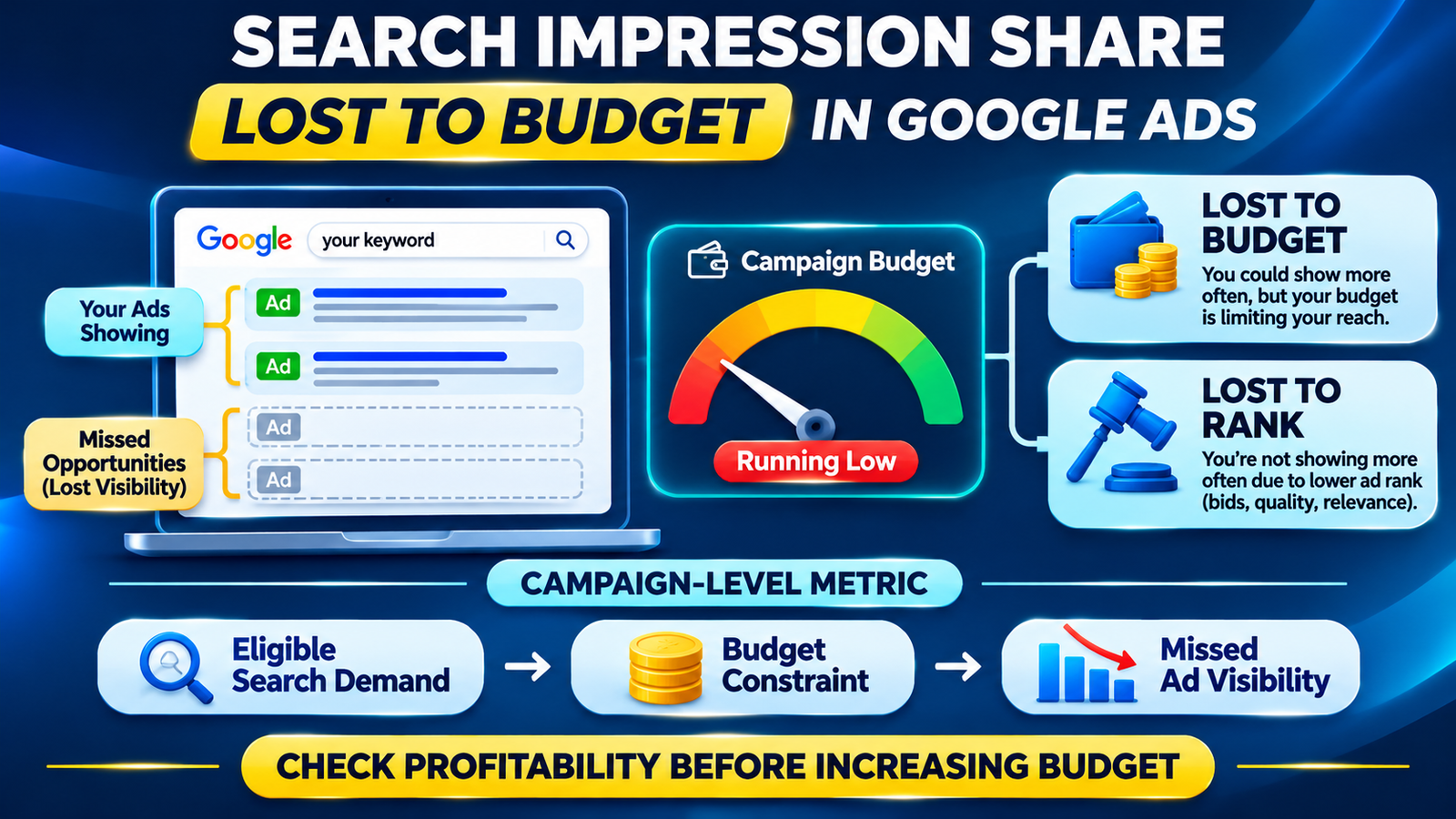
Search Impression Share Lost to Budget is a Google Ads competitive metric that estimates how often your Search ads were not shown because the campaign did not have enough budget. It helps identify budget-related visibility constraints, but it does not tell you how much extra revenue or how many conversions an increase in budget will produce. The useful question is not simply “How much impression share am I losing?” but “Would buying more of this eligible search demand be profitable?”
This guide focuses on the Search lost IS (budget) column: what it measures, where to find it, how to read it alongside other campaign data, and how to decide whether to increase spend or improve efficiency first. For the broader concept and formula, see our guide to Impression Share in Google Ads.
Table of Contents
What Search Impression Share Lost to Budget Actually Measures
Google defines Search lost IS (budget) as the percentage of time your ads were not shown on the Search Network because of insufficient budget. In practical terms, Google estimates that your campaign was eligible to appear in certain Search opportunities, but budget limitations prevented it from showing in some of them.
It is a visibility diagnostic, not a spend percentage. If a campaign reports 28% Search lost IS (budget), that does not mean 28% of its budget was wasted, that 28% more clicks are guaranteed if you raise the budget, or that the campaign needs a 28% budget increase. It indicates an estimated budget-related restriction on eligible Search visibility.
The metric also does not measure every search taking place in the market. Impression share calculations use estimated eligible opportunities. Eligibility is influenced by factors such as targeting, approval status and auction competitiveness, so the metric should be interpreted within the campaign settings and date range you are reviewing.
Search Impression Share, Lost to Budget and Lost to Rank: The Difference
These metrics answer related but different questions. Reviewing them together helps you distinguish a budget constraint from an Ad Rank constraint.
| Metric | What it tells you | What to investigate |
|---|---|---|
| Search impression share | The impressions received divided by estimated eligible impressions | How much eligible Search visibility the campaign captures |
| Search lost IS (budget) | Estimated share of time ads were not shown due to insufficient budget | Daily budget, demand, CPC pressure and budget allocation |
| Search lost IS (rank) | Estimated share of time ads were not shown due to poor Ad Rank | Bids, ad quality, relevance and landing-page experience |
Do not assume these figures will always form a perfectly reconciled 100% breakdown. They are estimates calculated for eligible auction opportunities, and availability can vary by reporting level and campaign type. Use the definitions in Google’s documentation and compare like-for-like campaign data rather than relying on a simple subtraction.
Where to Find Search Lost IS (Budget) in Google Ads
Google makes this metric available at the campaign level only. It is not a keyword-level or ad-group-level budget-loss column. In Report Editor, Google lists it in the Campaigns report rather than the Ad groups report.
- Open the Google Ads account and go to Campaigns.
- Open the campaign table for the Search campaigns you want to assess.
- Select the Columns icon and choose to modify the columns.
- Expand Competitive metrics.
- Add Search lost IS (budget) and, where available, compare it with Search impression share and Search lost IS (rank).
- Apply the columns and select a representative date range.
Allow for reporting delay before drawing conclusions. Google says impression share metrics are updated within one to two days. Very short date ranges can also be volatile, particularly when conversion volume is low or demand changes from day to day.
How to Interpret a High Search Lost IS (Budget) Percentage
A higher percentage means budget is restricting more of the campaign’s estimated eligible Search visibility. Whether that is a problem depends on what the campaign is achieving with the budget it already has.
Example: 28% Search lost IS (budget)
Imagine a Search campaign reports 54% Search impression share and 28% Search lost IS (budget) for the selected period. Treat the 28% as an estimated budget-related visibility constraint, not as a forecast that a 28% budget increase will recover the missed opportunities. The additional auctions may have different costs, conversion rates and commercial value from the traffic the campaign already receives.
Before changing the budget, check actual cost per conversion, qualified-lead rate or revenue, conversion value per cost, search-term quality and the campaign’s share of total account spend. If the campaign is consistently profitable and can absorb more volume, the metric may reveal a worthwhile scaling opportunity. If performance is below the business threshold, more budget may simply buy more unprofitable traffic.
Why Search Lost IS (Budget) Can Increase
1. The budget is small relative to eligible demand
A campaign may be eligible for more searches than its daily budget can support. This can happen when demand expands, targeting becomes broader, more keywords become eligible or the campaign is deliberately funded below its full opportunity. A high value is not automatically a mistake; it may reflect a conscious budget cap.
2. Average CPC or auction costs have risen
When clicks become more expensive, a fixed budget can be consumed with fewer clicks. Increased competition, changes in query mix or a shift towards more expensive auctions can make the same daily budget cover less activity. Review Average CPC in Google Ads over the same period and compare it with conversion quality, not just click volume.
3. Too many campaigns are competing for a limited account budget
If several campaigns share a fixed marketing allocation, the account may be funding lower-priority activity while high-intent campaigns are constrained. Review budgets by business objective, location, product or lead value. The answer may be reallocating spend rather than increasing the total account budget.
4. Targeting and campaign structure expose the budget to too much demand
Broad geographic coverage, a large keyword set or loosely controlled search intent can create more eligible traffic than the campaign should pursue. Check search terms, match-type behaviour, location settings, ad schedules and negative keywords. Tightening irrelevant reach can help the available budget focus on the searches most likely to produce a valuable outcome.
5. Budget or campaign settings changed during the reporting period
A budget change, new targeting, a new campaign or a shift in search demand can make a period difficult to compare with the previous one. Annotate major changes and compare equivalent periods. Do not attribute every movement in the metric to competition or budget without checking what changed in the account.
Should You Increase the Google Ads Budget?
Increase budget when there is evidence that additional eligible traffic is likely to create incremental business value at an acceptable cost. Do not increase it just to make the Search lost IS (budget) number smaller.
Consider increasing budget when:
- The campaign is meeting its qualified-lead CPA, customer acquisition cost or contribution-margin target.
- Conversion tracking is reliable and the primary conversion actions represent real business outcomes.
- Search terms and locations are relevant, and lead or order quality is stable.
- The campaign is regularly constrained by budget while valuable demand remains available.
- The business can fund the additional spend and handle the extra sales or lead volume.
Optimise before increasing budget when:
- CPA is above the acceptable level or return is below the required threshold.
- Search terms include irrelevant or low-intent queries.
- Many recorded conversions are duplicate, unqualified or low-value actions.
- Landing-page conversion rate or sales follow-up is weak.
- The account is spending on lower-priority campaigns while stronger campaigns have limited budgets.
For a deeper review of the campaign status and possible fixes, read Google Ads Limited by Budget. That guide covers the status and broader ways to address it; this article explains how to use the specific lost-impression-share metric when deciding what to do.
A Practical Process for Turning the Metric into a Budget Decision
Step 1: Validate the measurement
Confirm that the campaign is a Search campaign, the date range is long enough to be meaningful, and the metric is being read at campaign level. Check conversion actions, attribution settings and conversion values. If tracking is unreliable, fix that before using reported CPA or return to justify more spend. Our guide to Google Ads conversion tracking explains the measurement foundation.
Step 2: Diagnose the type of constraint
Read Search lost IS (budget) beside Search lost IS (rank), impression share, average CPC and the campaign’s cost and conversion trends. Budget loss points to a funding constraint; rank loss points to auction competitiveness. Both can exist, but they require different responses. For rank-related issues, review ad relevance and your Google Ads Quality Score diagnostics rather than assuming a budget increase will solve everything.
Step 3: Estimate the value of incremental traffic
Use historical performance as a starting point, not a guarantee. Estimate what additional clicks could cost at current CPC levels, then apply a realistic conversion rate and a realistic value per qualified lead or order. Use conservative assumptions and account for sales close rate, refunds, margin and fulfilment costs where relevant. The more uncertain the assumptions, the smaller the initial budget test should be.
Step 4: Reallocate or test a controlled increase
If another campaign is consuming budget without meeting its objective, consider reallocating funds before adding to the account total. If the campaign is profitable and capacity exists, increase the budget in a controlled step that the business can afford. Avoid changing budgets, bidding targets, keywords and landing pages all at once; otherwise, it becomes difficult to identify what caused the result.
Step 5: Evaluate marginal performance
After the change, allow for conversion delay and compare the incremental spend with the incremental qualified conversions, revenue or contribution. Average CPA can remain attractive while the next tranche of traffic is more expensive. Watch marginal CPA or marginal return, not only the campaign’s lifetime average. If the additional spend weakens economics, pause further scaling and review targeting, bids and budget allocation.
Three Practical Scenarios
| Scenario | What the data shows | Recommended response |
|---|---|---|
| Profitable lead generation | Lost IS (budget) is elevated, qualified-lead CPA is below the business limit, and sales quality is stable | Test additional budget carefully and monitor cost per qualified lead and closed-sale rate |
| Weak lead quality | Lost IS (budget) is elevated, but many enquiries are irrelevant or fail qualification | Improve search-term controls, conversion goals and lead-quality feedback before scaling |
| Low-margin eCommerce | Budget loss is visible, but revenue ROAS does not cover product and fulfilment economics | Calculate contribution margin and required return before adding spend |
7 Practical Actions Before You Increase Budget
Use this sequence when Search Impression Share Lost to Budget appears high. It keeps the decision tied to commercial outcomes rather than the percentage alone.
- Confirm the reporting scope. Check the campaign-level column, campaign type and date range. Allow for the one-to-two-day reporting update window before comparing recent data.
- Compare the two main constraints. Read Search lost IS (budget) alongside Search lost IS (rank) and Search impression share. This helps identify whether funding, Ad Rank or both are restricting visibility.
- Prioritise campaigns by value. Compare qualified leads, sales, contribution margin and strategic importance. A campaign with a smaller budget-loss percentage may still deserve funding first if its incremental outcomes are more valuable.
- Review the search-term mix. Find queries that consume spend without producing qualified outcomes. Add negatives or tighten targeting where the evidence supports it, rather than excluding relevant searches just to reduce traffic.
- Check CPC and bidding behaviour. Compare average CPC and conversion performance over the same period. If auction costs have risen, assess whether the campaign can still acquire customers within the business’s acceptable economics.
- Model a conservative scenario. Estimate the likely cost of additional clicks using recent CPC and conversion-rate data, then apply realistic qualification, close-rate and margin assumptions. Treat the result as a planning estimate, not a forecast from the lost-share percentage.
- Test, measure and decide. If the economics support more volume, make a controlled budget change and monitor marginal CPA, qualified-lead rate or contribution. If incremental performance deteriorates, stop scaling and revisit targeting or allocation.
These steps turn Search Impression Share Lost to Budget into a useful planning signal. They also help prevent a common mistake: buying additional impressions simply because the campaign has room to show more often, without checking whether those impressions are commercially worthwhile.
Common Mistakes to Avoid
- Increasing budget by the same percentage as lost IS: the metric is not a direct budget-shortfall calculator.
- Treating every lost impression as valuable: more visibility is useful only when the additional searches can produce worthwhile outcomes.
- Reading the metric at keyword level: Google reports Search lost IS (budget) at campaign level only.
- Confusing budget loss with rank loss: budget and Ad Rank are different constraints and need different actions.
- Using one day’s data: compare a representative period and allow for reporting updates and conversion lag.
- Ignoring the rest of the funnel: clicks and form submissions are not enough if qualified leads, sales or margin are weak.
- Assuming a high percentage is always bad: a deliberate budget cap can be sensible when the campaign is already at its profitable scale.
Frequently Asked Questions
What does Search lost IS (budget) mean in Google Ads?
It estimates the percentage of time your Search ads were not shown because the campaign had insufficient budget. It is a campaign-level visibility metric, not a measure of wasted spend.
Is Search lost IS (budget) available at keyword or ad-group level?
No. Google says Search lost IS (budget) is available at campaign level only. In Report Editor, it is available in the Campaigns report, not the Ad group report.
What is a good Search lost IS (budget) percentage?
There is no universal ideal percentage. A low value may be appropriate for a campaign that should capture most profitable demand, while a higher value may be an intentional cap on a campaign that has reached its budget allocation. Judge it against business economics and growth capacity.
Should I increase my daily budget if Search lost IS (budget) is high?
Only when the campaign is producing acceptable incremental results and the business can fund more volume. Check CPA, qualified-lead quality, conversion value, margin and search-term relevance first. The metric alone does not forecast the return from extra spend.
Why is Search lost IS (budget) high when my campaign does not spend its full daily budget?
Do not use this metric in isolation to diagnose underspend. Check the same date range and campaign-level report, then review eligibility, search demand, targeting, schedules, bidding constraints and reporting delay. The metric describes estimated budget-related missed visibility; it does not explain every reason a campaign may underspend.
Does Search lost IS (budget) plus Search lost IS (rank) equal 100%?
Do not treat the two columns as a guaranteed arithmetic split. Impression share metrics are estimates based on eligible auction opportunities and can have different availability by reporting level. Use Google’s definitions and compare the same campaign and period.
Final Takeaway
Search Impression Share Lost to Budget shows when insufficient campaign budget is restricting eligible Search visibility. It is most useful as a prompt for investigation: check whether the campaign is profitable, whether the additional search demand is relevant, and whether more budget is likely to produce incremental value. Increase spend when the economics support it; otherwise, improve measurement, targeting and allocation before buying more traffic.
For official definitions and reporting details, consult Google’s guides to getting impression share data, how impression share works and improving impression share.