

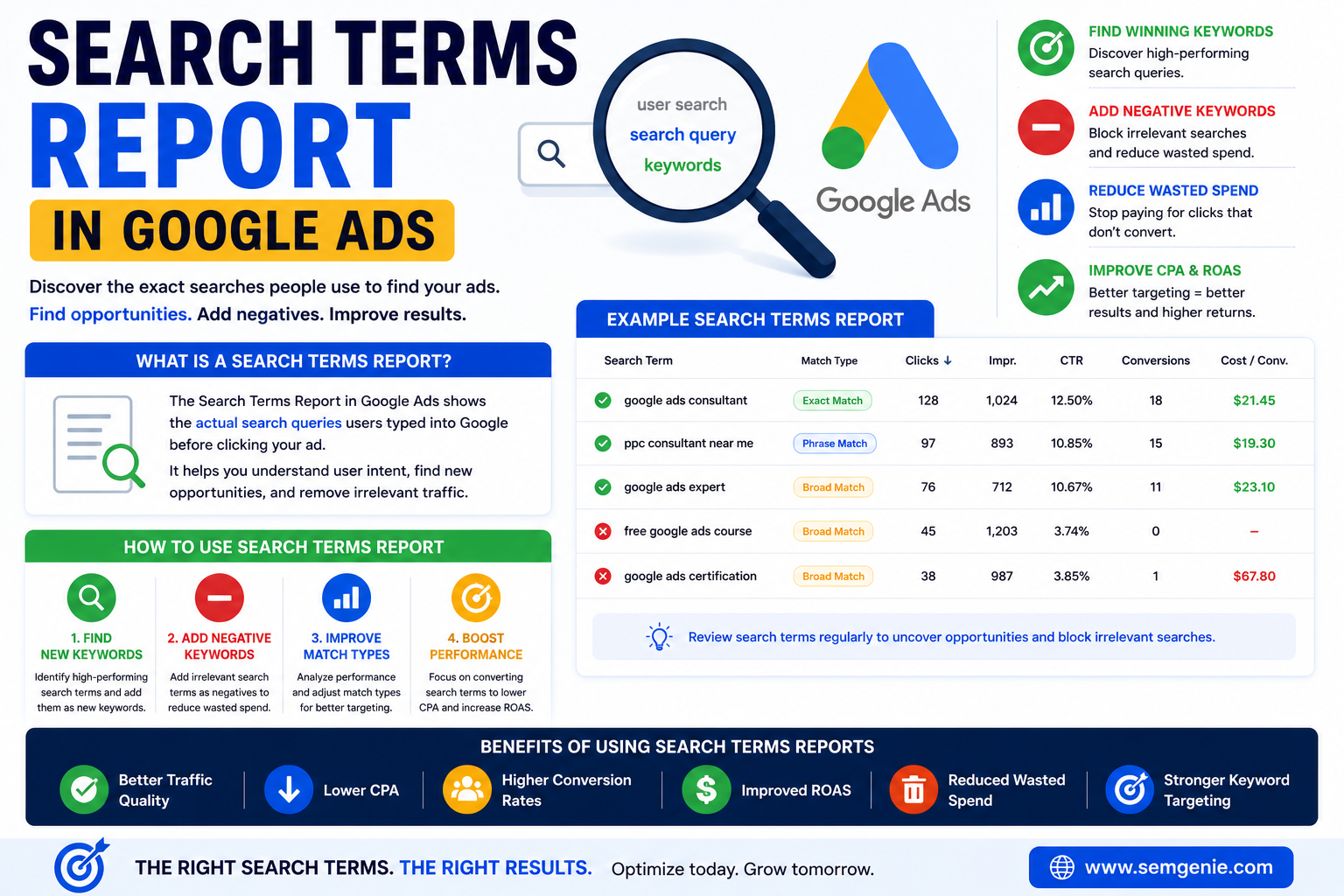
A Search Terms Report in Google Ads is one of the most valuable tools available to advertisers.
While keywords determine when your ads may appear, the Search Terms Report shows the actual search queries people used before clicking your ads.
Understanding the Search Terms Report in Google Ads helps advertisers discover new opportunities, improve targeting, reduce wasted spend, and increase campaign profitability.
In this guide, you’ll learn what a Search Terms Report is, why it matters, and how to use it to optimize Google Ads campaigns.
What Is a Search Terms Report in Google Ads?
A Search Terms Report in Google Ads shows the real search queries users entered into Google before your ad appeared and received a click.
For example, you may target the keyword:
google ads consultant
However, users might actually search:
- google ads expert
- ppc consultant near me
- google advertising specialist
- google ads management services
The Search Terms Report reveals these actual searches.
Why Is the Search Terms Report Important?
The Search Terms Report helps advertisers:
- Identify high-performing search queries
- Discover new keyword opportunities
- Find irrelevant searches
- Add negative keywords
- Improve traffic quality
- Reduce wasted ad spend
- Improve CPA
- Increase ROAS
Many successful Google Ads optimizations begin with reviewing Search Terms Reports.
Keywords vs Search Terms
Many advertisers confuse keywords and search terms.
Keywords
Keywords are the terms advertisers add to campaigns.
Example:
google ads consultant
Search Terms
Search terms are the actual words users type into Google.
Example:
best google ads consultant near me
The Search Terms Report bridges the gap between your keywords and real user behavior.
How to Find the Search Terms Report
In Google Ads:
- Open your campaign.
- Click Keywords.
- Select Search Terms.
- Review actual user queries.
Google Ads displays search terms that generated clicks, impressions, or conversions.
How to Use a Search Terms Report
Find New Keywords
The report often reveals valuable search queries that are not currently targeted.
Example:
Search Term:
google ads consultant for ecommerce
This may become a new keyword opportunity.
Add Negative Keywords
The report also identifies irrelevant traffic.
Example:
free google ads course
If your goal is lead generation, this search may not be relevant.
Adding “free” as a negative keyword can reduce wasted spend.
Improve Match Types
Search Terms Reports help advertisers evaluate:
- Broad Match performance
- Phrase Match performance
- Exact Match performance
This information can improve targeting decisions.
Improve Conversion Performance
Identify search terms that generate:
- Leads
- Sales
- Calls
- Conversions
These terms often deserve additional budget and attention.
Search Terms Report and Negative Keywords
Negative keywords are one of the most powerful outcomes of Search Terms Report analysis.
Examples include:
- free
- jobs
- training
- course
- certification
Adding irrelevant terms as negatives can significantly improve traffic quality.
Search Terms Report and CPA
Search Terms Reports directly influence CPA.
By eliminating irrelevant searches:
- Wasted clicks decrease
- Conversion rates improve
- CPA often decreases
Many advertisers discover that a large percentage of spend comes from low-quality search terms.
Search Terms Report and ROAS
Search Terms Reports also help improve ROAS.
By identifying high-converting search queries, advertisers can:
- Increase bids on profitable searches
- Expand successful keyword themes
- Improve budget allocation
This often results in stronger advertising returns.
Common Search Terms Report Mistakes
Never Reviewing Search Terms
Many advertisers launch campaigns and never review actual search queries.
This often leads to wasted spend.
Ignoring Negative Keywords
Without negative keywords, irrelevant traffic can increase quickly.
Overreacting to Limited Data
Avoid making decisions based on a small number of clicks.
Look for patterns and meaningful data.
Focusing Only on Clicks
Prioritize conversions and business outcomes rather than traffic alone.
Search Terms Report Best Practices
Review Weekly
Most advertisers should review Search Terms Reports at least once per week.
Add Negative Keywords Regularly
Build and maintain a negative keyword list.
Identify Winning Queries
Promote high-performing search terms into dedicated keywords when appropriate.
Monitor Conversion Data
Focus on search terms that generate meaningful business results.
Benefits of Using Search Terms Reports
Advertisers who regularly review Search Terms Reports often achieve:
- Better traffic quality
- Lower CPA
- Higher Conversion Rates
- Improved ROAS
- Reduced wasted spend
- Better keyword targeting
Search Terms Reports are one of the easiest ways to improve campaign performance without increasing budget.
Frequently Asked Questions
What is a Search Terms Report in Google Ads?
A Search Terms Report shows the actual search queries users entered before clicking your ads.
Why is the Search Terms Report important?
It helps advertisers discover new keywords, add negative keywords, improve targeting, and reduce wasted spend.
How often should I review Search Terms Reports?
Most advertisers should review them weekly or bi-weekly.
Can Search Terms Reports reduce CPA?
Yes. Removing irrelevant traffic often improves Conversion Rates and lowers CPA.
What is the difference between keywords and search terms?
Keywords are the terms advertisers target, while search terms are the actual queries users enter into Google.
Final Thoughts
The Search Terms Report in Google Ads is one of the most powerful optimization tools available to advertisers.
It provides direct insight into how users search, which queries generate results, and where wasted spend occurs.
Businesses that regularly review Search Terms Reports can improve targeting, discover valuable keywords, add effective negative keywords, lower CPA, and increase ROAS.
Whether you’re managing campaigns yourself or working with a PPC consultant, reviewing Search Terms Reports should be a regular part of your optimization process.
If you’re unsure whether your campaigns are attracting the right traffic, a professional Google Ads audit can help uncover opportunities hidden within your Search Terms Reports.