

If you’ve ever wondered why your Google Ads campaigns are generating clicks but not leads or sales, negative keywords may be part of the solution.
Many advertisers focus heavily on finding the right keywords but overlook the importance of preventing ads from appearing for the wrong searches. Without proper negative keyword management, businesses can waste advertising budget on irrelevant traffic that has little chance of converting.
Understanding what negative keywords are and how to use them effectively is one of the most important skills in Google Ads optimization.
In this guide, you’ll learn what negative keywords are, why they matter, how they work, and how they can help improve campaign performance while reducing wasted ad spend.
What Are Negative Keywords in Google Ads?
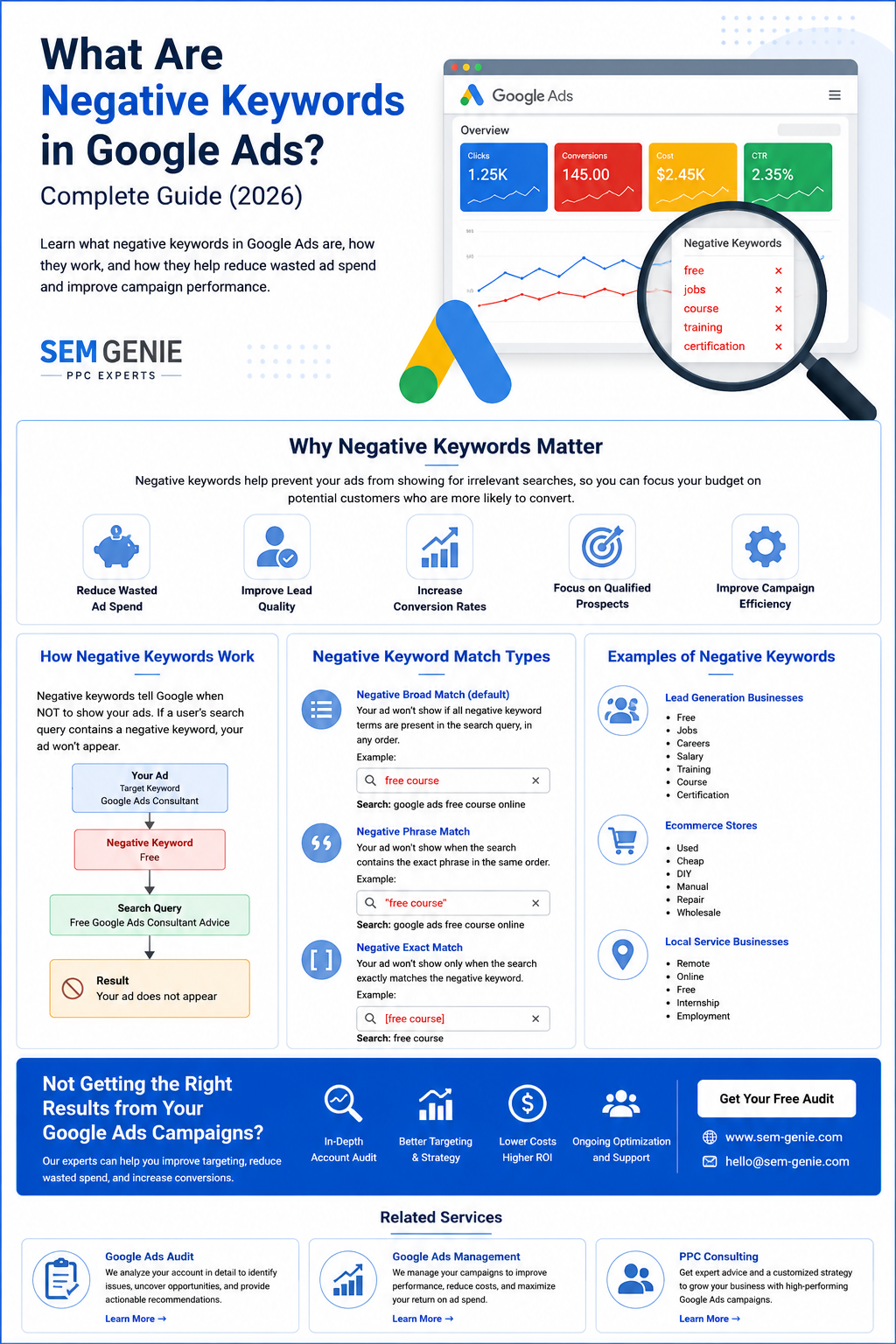
Negative keywords are words or phrases that prevent your ads from appearing when users include those terms in their search queries.
Unlike regular keywords, which tell Google when to show your ads, negative keywords tell Google when not to show them.
For example, imagine you own a business that offers professional Google Ads management services.
You may target keywords such as:
- Google Ads management
- PPC consulting
- Google Ads consultant
However, you may not want your ads to appear for searches such as:
- Free Google Ads course
- Google Ads jobs
- Google Ads certification
In this case, you could add negative keywords such as:
- Free
- Jobs
- Certification
- Training
This helps ensure your budget is spent on potential customers rather than irrelevant searches.
Why Negative Keywords Matter
Many advertisers lose money because their ads appear for searches that are not relevant to their business.
Even if those users click the ad, they often have no intention of becoming customers.
Negative keywords help:
- Reduce wasted ad spend
- Improve lead quality
- Increase conversion rates
- Improve campaign efficiency
- Focus budget on qualified prospects
For many advertisers, negative keywords are among the fastest ways to improve campaign performance.
How Negative Keywords Work
Google evaluates search queries against your keyword list and your negative keyword list.
If a search query contains a negative keyword that matches your exclusion criteria, your ad will not appear.
For example:
Target Keyword:
Google Ads ConsultantNegative Keyword:
FreeSearch Query:
Free Google Ads Consultant AdviceResult:
Your ad does not appear.
This prevents unnecessary clicks and helps preserve budget for higher-quality searches.
Types of Negative Keyword Match Types
Google Ads supports three main negative keyword match types.
Negative Broad Match
This is the default negative keyword type.
Your ad won’t show if all negative keyword terms are present in the search query, regardless of order.
Example:
Negative Keyword:
free courseSearch Query:
google ads free courseAd will not show.
Negative Phrase Match
Your ad won’t show when the search contains the exact phrase in the same order.
Example:
Negative Keyword:
"free course"Search Query:
google ads free course onlineAd will not show.
Negative Exact Match
Your ad won’t show only when the search exactly matches the negative keyword.
Example:
Negative Keyword:
[free course]Search Query:
free courseAd will not show.
Search Query:
google ads free courseAd may still show.
Examples of Negative Keywords
Different businesses require different negative keywords.
Lead Generation Businesses
Common negative keywords include:
- Free
- Jobs
- Careers
- Salary
- Training
- Course
- Certification
Ecommerce Stores
Common negative keywords include:
- Used
- Cheap
- DIY
- Manual
- Repair
- Wholesale
Local Service Businesses
Common negative keywords include:
- Remote
- Online
- Free
- Internship
- Employment
Regularly reviewing search terms helps identify additional exclusions.
How to Find Negative Keywords
Review Search Terms Reports
One of the best ways to discover negative keywords is by reviewing the Search Terms Report.
This report shows the actual searches that triggered your ads.
Look for:
- Irrelevant searches
- Non-converting searches
- Low-intent searches
- Research-focused queries
Analyze Conversion Data
Searches that consistently generate clicks without conversions may indicate opportunities for negative keywords.
Review Competitor Keywords
Understanding industry terminology can help identify phrases that attract the wrong audience.
Conduct Regular Audits
A professional Google Ads Audit often uncovers significant opportunities to improve negative keyword management.
Benefits of Using Negative Keywords
Lower Cost Per Click
Reducing irrelevant traffic often improves overall efficiency and lowers advertising costs.
Better Lead Quality
Ads are shown to users with stronger buying intent.
Improved Conversion Rates
Focusing on qualified traffic often leads to better conversion performance.
Better Return on Investment
Less wasted spend means more budget can be invested in searches that generate revenue.
Improved Campaign Efficiency
Negative keywords help advertisers allocate resources more effectively.
Common Negative Keyword Mistakes
Not Reviewing Search Terms
Many advertisers add keywords but never review the searches that trigger their ads.
Using Too Few Negative Keywords
Without sufficient exclusions, campaigns often attract low-quality traffic.
Blocking Valuable Traffic
Adding overly broad negative keywords can prevent qualified prospects from seeing your ads.
Failing to Update Lists
Search behavior changes over time. Negative keyword lists should be reviewed regularly.
Who Should Use Negative Keywords?
The short answer is everyone.
Whether you’re a:
- Small business
- Ecommerce company
- B2B organization
- Local service provider
- Enterprise advertiser
Negative keywords play an important role in improving campaign performance.
Any business investing in Google Ads can benefit from proper negative keyword management.
Frequently Asked Questions
What are negative keywords in Google Ads?
Negative keywords are words or phrases that prevent your ads from appearing for certain searches, helping reduce wasted ad spend and improve targeting.
Do negative keywords save money?
Yes. Negative keywords help prevent irrelevant clicks, which can reduce advertising costs and improve campaign efficiency.
How often should I review negative keywords?
Most advertisers should review search terms and negative keyword opportunities at least monthly.
Can negative keywords improve conversion rates?
Yes. By filtering out irrelevant traffic, negative keywords often improve lead quality and conversion performance.
What is a negative keyword list?
A negative keyword list is a collection of exclusions that can be applied across multiple campaigns to improve efficiency and consistency.
Final Thoughts
Understanding what negative keywords are in Google Ads is essential for anyone running paid search campaigns.
While targeting the right keywords helps attract potential customers, negative keywords help eliminate irrelevant traffic that can drain advertising budgets.
When combined with strong campaign structure, effective ad copy, accurate conversion tracking, and ongoing optimization, negative keywords can significantly improve advertising performance.
If your campaigns are generating clicks but not producing the results you expect, reviewing your negative keyword strategy may be one of the fastest ways to improve performance.